- In front of us is a full—fledged cheat kit for a shooter, spread out in four tabs. Below is a live description of what the software can do.
- Aimbot — the heart of the kit
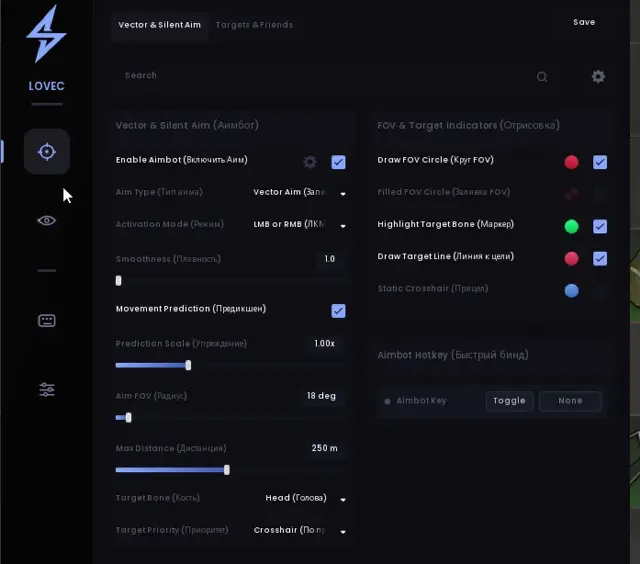
- The main tab is responsible for pointing. It turns on by pressing a hotkey, and the bot takes control.
- Auto—change targets - as soon as the current target falls or leaves the zone, the AIM instantly switches to the next one. There is a configurable delay so that switching does not look jerky.
- Visibility check — the bot will not shoot through the walls, but will wait until the target actually appears.
- Ignore the parties — they don't get their sights set.
- The FOV radius is a circular area around the scope within which the bot searches for targets. The radius can be drawn on the screen: the number of segments and the line thickness can be adjusted.
- The dot—bone display shows exactly where the bot is aiming. The point size is adjustable.
- The maximum distance is beyond its limits, the AIM simply does not respond.
- Bone selection is the most delicate part. The dice are selected interactively directly on the model, and the priority can be set by a multi-selection: for example, first the head, then the neck, then the chest. The bot will guide the target through this list.
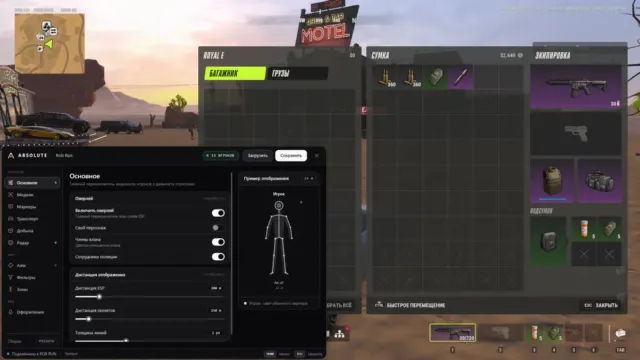
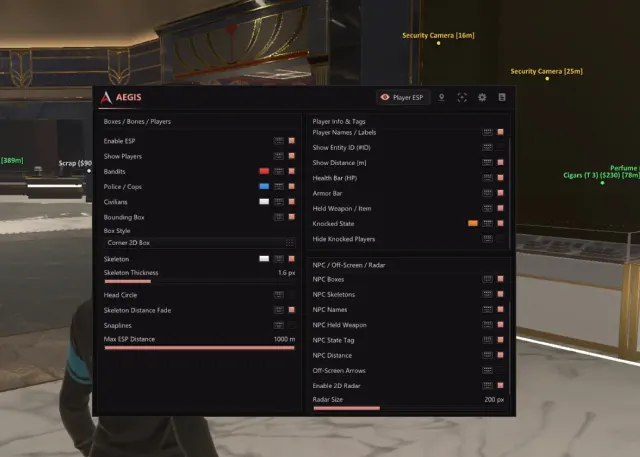
- 👁 Visual — ESP for full control over the situation
- Everything that is drawn on top of the game is here.
- The square has three modes: off, normal, and corners. The thickness, fill, and a separate color are adjusted for the visible target — it's immediately clear who is really in the affected area.
- Name — with the option to show clan, color by faction, and a separate color for teammates. The font size is adjustable.
- Distance and weapons are compact signatures with font settings.
- Faction — a caption with a color for each faction; the list of colors is filled in as new factions are encountered.
- Skeleton — the thickness of the lines is adjusted, and the color of each bone changes in appearance: one color is visible, another is behind the shelter.
- The visibility icon is a text indicator with customizable size, colors, and the text itself for visible and hidden states.
- Ignore the parties and maximize the distance so that the screen doesn't turn into mush.
- Live preview is a separate feature: all ESP elements can be moved with the mouse directly in the preview and immediately see the result. No guesses as to where the name will go.
- The world is everything around you
- Seven categories of world objects: doors, random loot, loot, points of interest, containers, cars, NPCs. Each has the same set of settings.:
- background,
- name/title,
- point,
- The distance,
- maximum distance,
- font size,
- icon size.
- That is, you can fine-tune what exactly to show: only doors and loot, or everything in general, including NPCs and cars.
- , Settings — everything is at hand
- Profiles — save, upload, reset.
- Font — name, size, change and reset.
- Menu keys, panic button (instantly knocks everything out), unload button, combat mode.
- Language — switch EN / RU / CN right in the menu header.
- Bottom line: the software closes the entire cycle — from guidance and full visual control to world objects and flexible customization. Everything is laid out on the shelves, nothing superfluous, but also without cuts: every little thing like the color of a single bone or segments of the FOV circle is customizable.
Features may vary by version. Make sure the software supports your Windows build and game mode before buying.


 Rob Run
 Escape from Tarkov
 ABI
 PUBG
 Rust
 Dayz
 War Dogs
 Escape from Tarkov: Arena
 VALORANT
 Genshin Impact
 Zenless Zone Zero
 Russian Fishing 4
 Warface