- Tundra WEB Radar for DayZ — server status in the browser
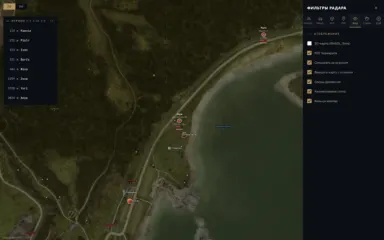
- This is a web radar that shows what’s happening around your character on a map opened in the browser — on the same computer, a second monitor, a phone, or a tablet. The map displays survivors, zombies and animals, vehicles, loot, base structures, and points of interest (POI). Players can see the username, the weapon in their hands, and the distance to other players. The Chernarus, Livonia, Sakhal, and Namalsk maps are supported — the required one is automatically detected based on the server. The cost is from 300 ₽ per day.
- How it works
- The radar is not an overlay on top of the game, but a separate page in the browser. The Tundra loader, launched on the computer with the game, transmits data about what is happening around the character, and the map opens where it’s convenient for you: in a neighboring tab, on a second screen, or on your phone. Nothing is rendered over the DayZ window, so the game window mode can be any. On mobile devices, the interface is adaptive: the map can be moved and scaled using gestures.
- Players, zombies, and animals
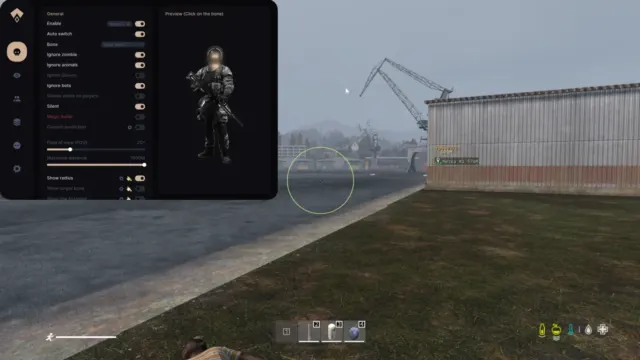
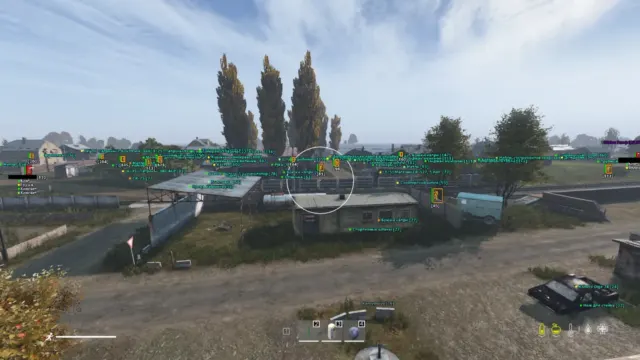
- You can enable survivors, infected, and animals separately. Each player has their nickname and the weapon they’re holding displayed; health, blood, and stamina are shown, along with the direction of gaze, distance, and height difference — this makes it clear whether the opponent is on the same level as you. Dead and unconscious players (“in the unk”) are marked separately. When you hover over a player, the radar shows their inventory and clothing.
- Friends can be added to the list: they are highlighted on the map and appear first in the list of players. The camera can follow the selected player (press F in the radar tab), and the radar can be switched to a teammate’s perspective.
- Vehicles and bullets in flight
- Cars are marked on the map with a type label — sedan, SUV, truck. When you hover over a vehicle, you can see the contents of the trunk and the installed parts: it’s clear even before you get close what the car is missing. A separate layer shows bullets in flight.
- Loot: categories, rare items and condition
- Items are displayed as icons with labels, and their size is adjustable. Loot is divided into categories — firearms, melee weapons, ammunition, explosives and grenades, attachments and optics, medicine, food and drinks, consumables, tools, crafting materials, cooking, spare parts, backpacks and clothing — and any of them can be hidden. Rare items are highlighted, and loot can be filtered separately by condition — from intact to broken.
- The map shows base structures, tents, and barrels. When you hover over a container, the radar shows what’s inside.
- DayZ maps: Chernarus, Livonia, Sakhal, Namalsk
- The radar works on the Chernarus+ (Chernarus), Livonia, Sakhal, and Namalsk maps — the map is selected automatically based on the server you’ve logged into. Points of interest are included by category: cities and villages, military bases, hospitals, police stations, fire departments, gas stations, shops, wells, helicopter crash sites, and contaminated zones. This makes it easier to plan a route: where to go for military loot and where to get water along the way.
- View, player list, and settings
- The map can be scaled, moved, and centered on itself; you can also enable tracking of the player and rotating the map along with them. There are movement traces, a kilometer grid, a compass ring, full‑screen mode, and a 3D map on WebGL (currently in beta version).
- The F2 key opens the list of players: search by nickname, sorting by distance, friends at the top, and a counter for players, zombies, and vehicles. F1 key — settings: you can disable any category, change the colors and sizes of the markers, and adjust the size of the distance numbers to fit the screen. The settings profile can be exported and imported; there is a reset to default settings. The interface is available in Russian and English. Hotkeys work when the radar tab is active, not the game window.
- System requirements and launch
- Windows 10 or Windows 11 (all versions except 26H1 and 26H2), an Intel or AMD processor, and DayZ in Steam are required. The game window mode can be any; a USB drive is not required. Before downloading the loader, disable Windows Defender, Core Isolation, and “Reputation‑based protection,” and uninstall third‑party antivirus software — otherwise, the loader will be deleted or blocked. The key is issued immediately after payment and is saved in your personal account (“My Purchases”). Step‑by‑step instructions for launching Tundra WEB Radar for DayZ.
- Risks
- Using any third‑party software violates DayZ’s rules and may result in a BattlEye ban — no reader can guarantee anything. Do not show the radar in streams and recordings: if the screen with the map tab open gets into the broadcast, viewers will see it. Do not use the radar on an account you value, and do not give away too much information about the enemy: shooting at invisible targets and making precise turns around corners will result in complaints and attract the attention of the server administration. There is no built‑in spoofing. All game‑related suggestions are in the DayZ cheats catalog.
Features may vary by version. Make sure the software supports your Windows build and game mode before buying.


 Dayz
Dayz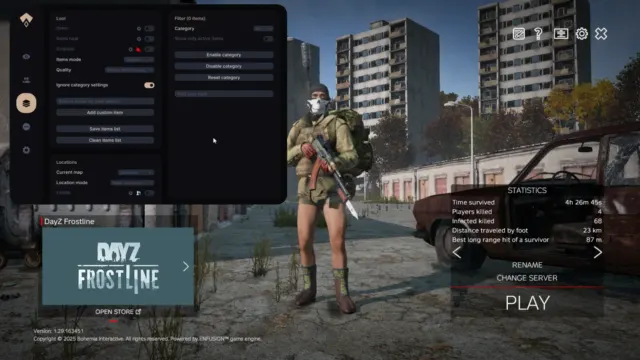
 Escape from Tarkov
 ABI
ABI PUBG
PUBG Rust
Rust War Dogs
 Escape from Tarkov: Arena
 VALORANT
 Genshin Impact
 Zenless Zone Zero
 Russian Fishing 4
 Warface
 Bodycam